There are tools available which will OCR selected text or tables to the clipboard, or OCR copied data, some using hotkeys. There are also PDF-to-text tools in some PDF readers as well as more conventional OCR tools with file output. The earlier ones I mentioned provide input to any app, meaning I do not have to worry about specific PDF import in other tools. Have a look around the applications sources relevant for your platform.
2 Likes
I like the ability to call external programs. This would make it easier to incorporate XSLT in my workflows.
1 Like
Implementation of string functions like:
len(string) for determining string length
left(string, number) for returning the left “x number” of characters in the string
right(string, number) for returning the right “x number” of characters in the string
mid(string,starting point, number) for returning the “x number” of characters starting at position “starting point” in string
These would be VERY helpful in manipulating and/or cleaning up data.
1 Like
You can use the length option from the calculate transform.
You can use the Extract transform. But number has to be a constant.
You can use the Extract transform. But number has to be a constant.
You can use a combination of Chop and Extract transform. But number has to be a constant.
The poll is now closed. Copy/paste in the winner and we will try to implement that as the next new feature. But we will bear the other votes in mind as well.
2 Likes
Copy and paste is available to try in this new snapshot release:
Please try it and let us know if you have any feedback.
1 Like
Copy and paste is now available in production release v2.12.0:
We’ve started preliminary work on:
Hopefully it will be in the next release. But there are various issues to work through, so no promises.
Yesterday I needed needed to work with some data whose origin was a table for a published chart. A quick couple of transforms were enough to fix the data almost ready for input to Datagraph except for the fact that the X column, having a scale -50 to +50, had entries only every ten rows (-50 -40 etc).
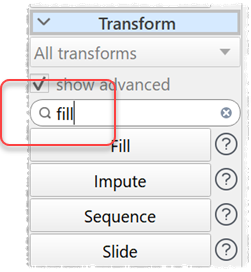
I looked at Fill, Impute and Interpolate without finding a solution to fill the missing rows with appropriate values. I had to take this back to a spreadsheet to use an “add 1 each row” formula to fix it, while believing I ought to be able to do this in EDT as an option in one of the above three transforms; for example, supplying starting and ending values to Fill or a start and increment.
Did I miss another option?
Did you try Sequence or Row Num ? Hard to be sure without seeing an example input and the desired output.
Sequence is the one I missed. Thanks.
At the bottom of the Help page, Sequence links each of Fill, Impute, Interpolate but none of those three link to Sequence. Correcting that is the change that is needed.
1 Like
I will fix that for the next release.
1 Like
Thank you. Not grokking all of EDT in my head, I have found that those links are invaluable for finding what I need after a first guess.
1 Like
You can also ask your favorite LLM which transform. They have been aggressively trawling our documentation. The results are hit and miss though (see the latest newsletter).
If an LLM says Sequence exists, would that be alongside Explode? 
I do use them for some purposes but think it worthwhile not to make them a default.