Is it possible to split the output of a file by row count? I need to split the file I’m transforming to a max of 1 million rows per output file.
Thanks
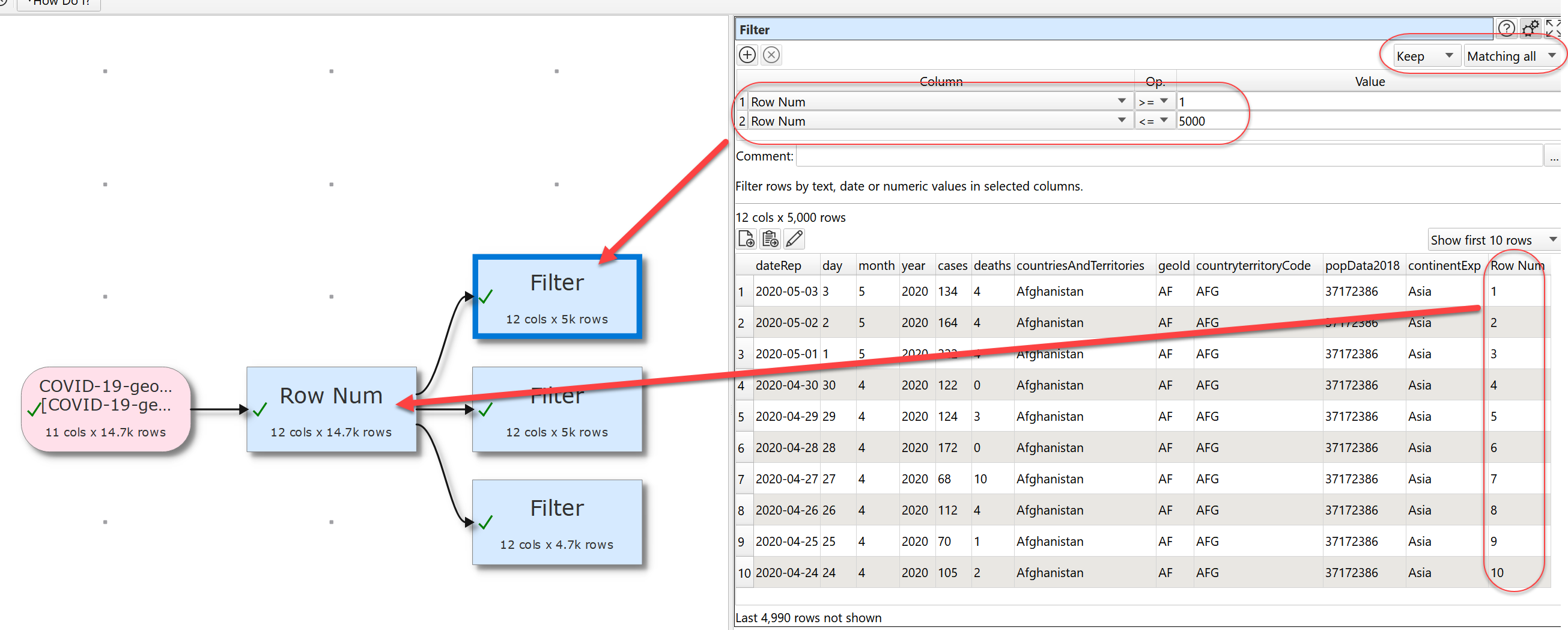
You can use a Row Num transform to number the rows and then a Slice transform chop it into sections. The attached image shows chopping a file into 5k row sections.

1 Like
Brilliant, thanks for your quick reply.
Is it possible to add a screenshot of the 2nd slice and/or filter settings? My 2nd box is currently returning 0 rows and I can’t quite figure out why. Thanks.
I have deleted the example. But in my example the second filter was set:
Matching all
Row Num >= 5001
Row Num <= 10000
@Admin don’t suppose there’s a plan to build a file split into normal functionality? Or does it already exist, since I raised my original query?
You can now dynamically split a file. See:
1 Like
Here an example to split into files with 25 rows with the multiple output functionality ….
Split file by rows.transform (6.8 KB)
1 Like
little optimisation, I could reduce the number of transformation by 2
Split file by rows 2.transform (5.6 KB)

1 Like
I checked the possibilities the Row Num transformation and now it is down to 3 transformations. My first thoughts and an implementation I did some month ago were much to complex. The necessary numbering to split the output can be done just with the Row Num Transformation, in a second step the file name with the number is setup with Substitute, afterwards the temporary column is removed. And the anyhow necessary output is done.
And yes it is “code golf”, but. I like the finger exercises it helps to get an understanding of the features and keep the brain fresh 
Split file by rows 3.transform (3.9 KB)
2 Likes