A transform menu appears when you start typing letters on a selected Input or Transform item. But there is no feedback on letters typed, which can be awkward if you type a letter wrong. In this snapshot release the keystrokes typed are now shown at the top of the menu. Note that you can remove typed letters with the Delete or Backspace key.
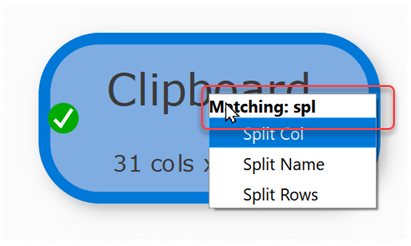
Thanks to Ziad for raising this issue.
Please try it and let us know if you have any issues or suggestions:
Windows: https://www.easydatatransform.com/downloads/EasyDataTransform_2_14_2_snapshot_1.exe
Mac: https://www.easydatatransform.com/downloads/EasyDataTransform_2_14_2_snapshot_1.dmg
As a snapshot release, it isn’t as thoroughly tested as a production release, but it should be fairly stable.
Is there something in Easy Data Transform you find annoying, unhelpful or unnecessarily time-consuming? Let us know.
