i Use the replace funktion and then regex for fixing it. It works quite well but with large datasets it takes a long time to process and it needs a lots of RAM is there a smother way to do it?
Possibly. It is hard to say without an example of inputs and outputs on which to work.
1 Like
Please supply some sample input and the corresponding output you want.
Leading Zeros.transform (2.7 KB) thank you  here is the example
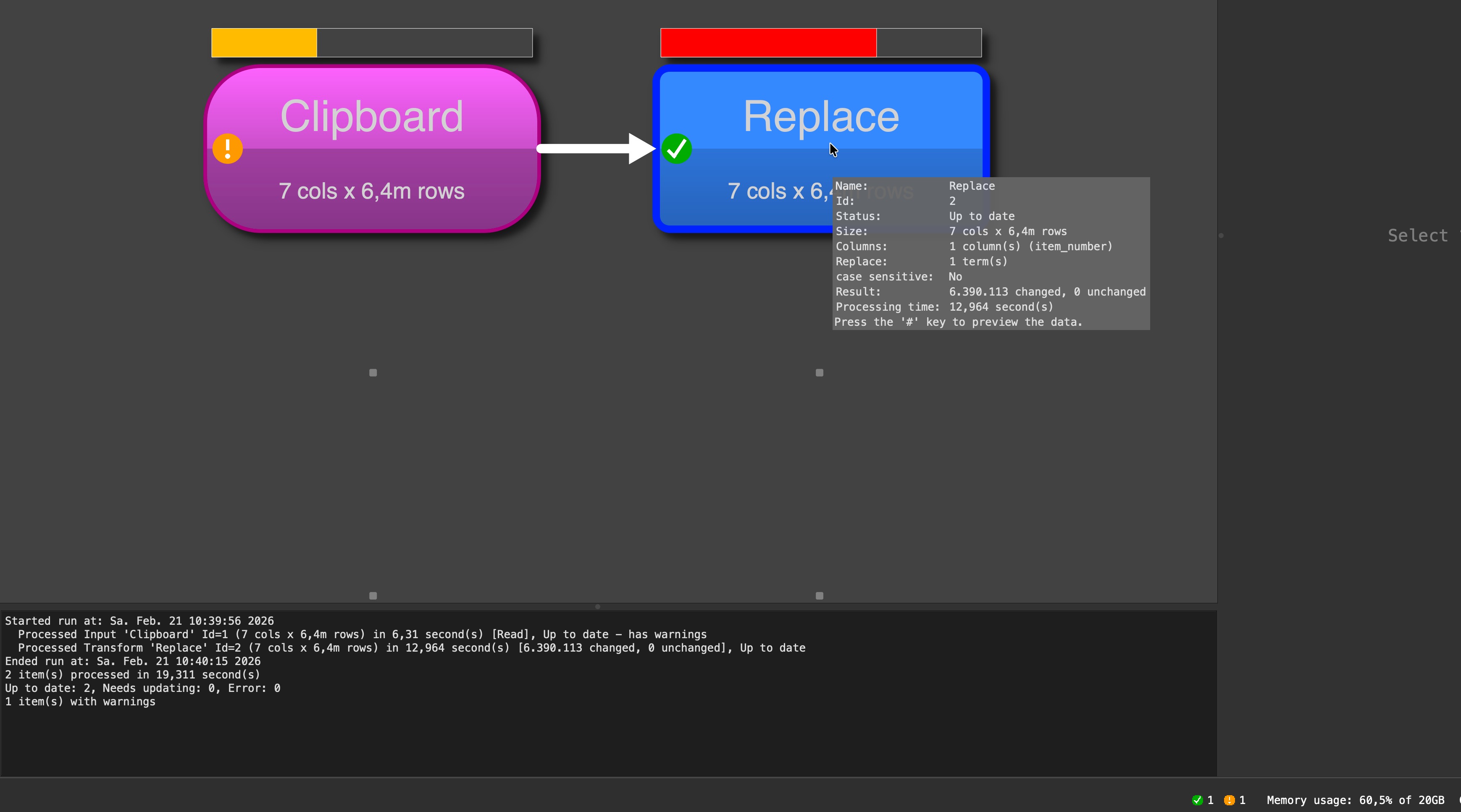
I multiplied your data to 6.4 million rows.
The file with the data in clipboard has 272 MB.
When I run it it use 60% of 20GB memory (ok, large but huge data set) and the replace needs 13 seconds (Mac with M2 processor). I think this is fine for the large amount of data. The reading from file to the clipboard need 6,3 seconds, so the complex calculation needs just twice of teh time of the reading without any logic. So I would say, excellent job of the engine. But for sure I have the advantage that I have enough memory on my notebook.
1 Like
Regular Expression are relatively slow and sometimes overkill for simple transformations.
If you use Chop to remove the first 4 characters it reduces the transform time for 2 million rows from 19.2s to 0.4s on my machine.
Num Format is a bit smarter and reduces the transform time for 2 million rows from 19.2s to 1.0s on my machine.
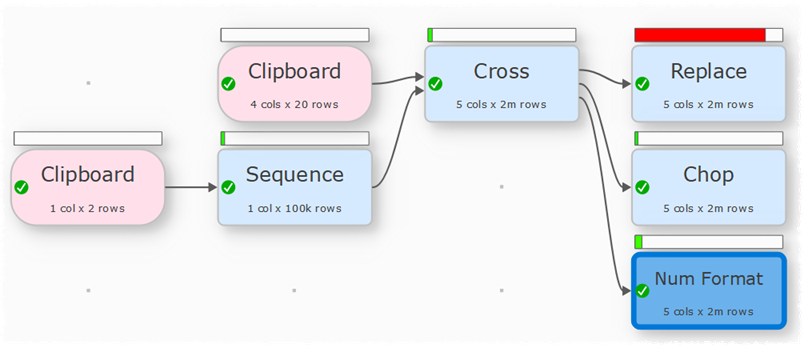
Leading-Zeros-with-chop.transform (5.0 KB)
1 Like
Content wise Chop can be dangerous, if the number of leading 0 is different for the accounts. I think “Num format” is a saver solution.
I was curious about the memory topic @Phil mentioned. Therefore I played a little around:
I executed all three suggestions in an individual transform file. Each time I closed EDT before starting a test and spend EDT empty before opening the different transform files.
My conclusion on memory is the data itself needs most of the memory. The first transformation added needs (with an internal data copy) significant memory. Additional transformations seems not to cost to much additional memory. But difference of memory use between the transformations seems to be minor.
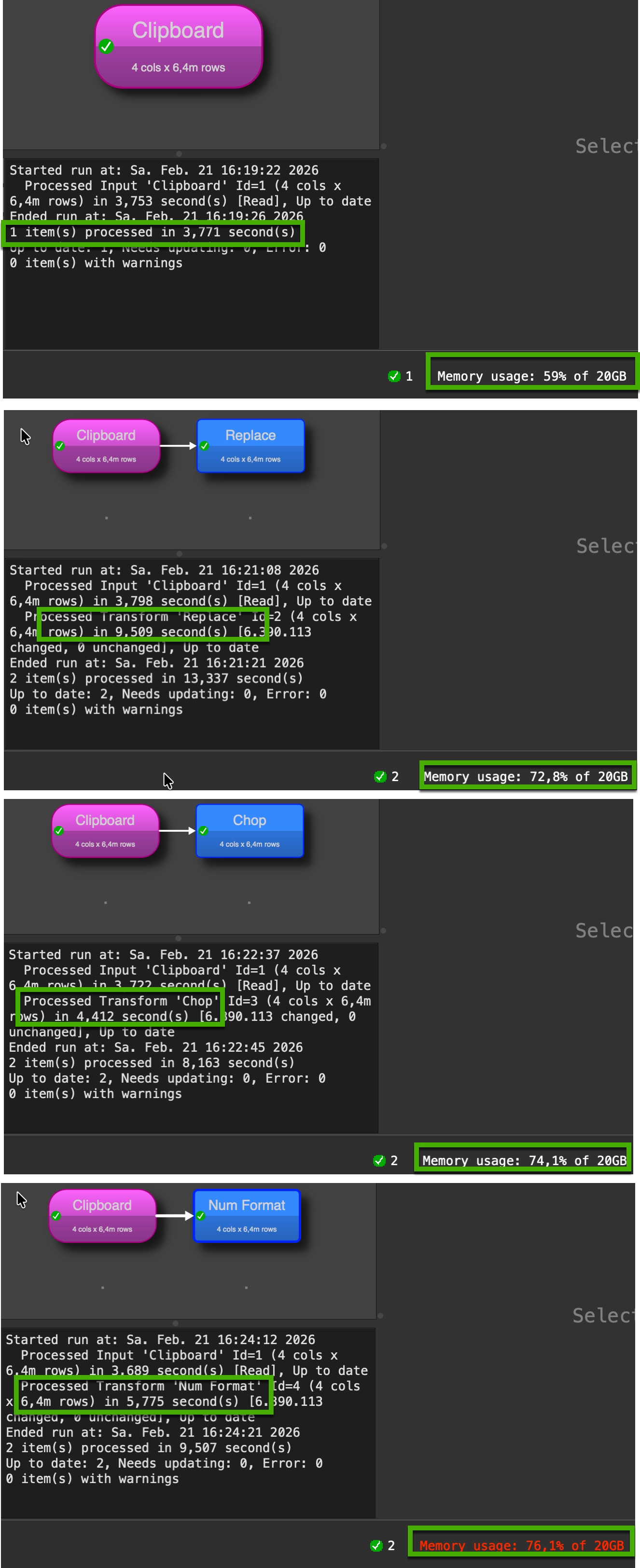
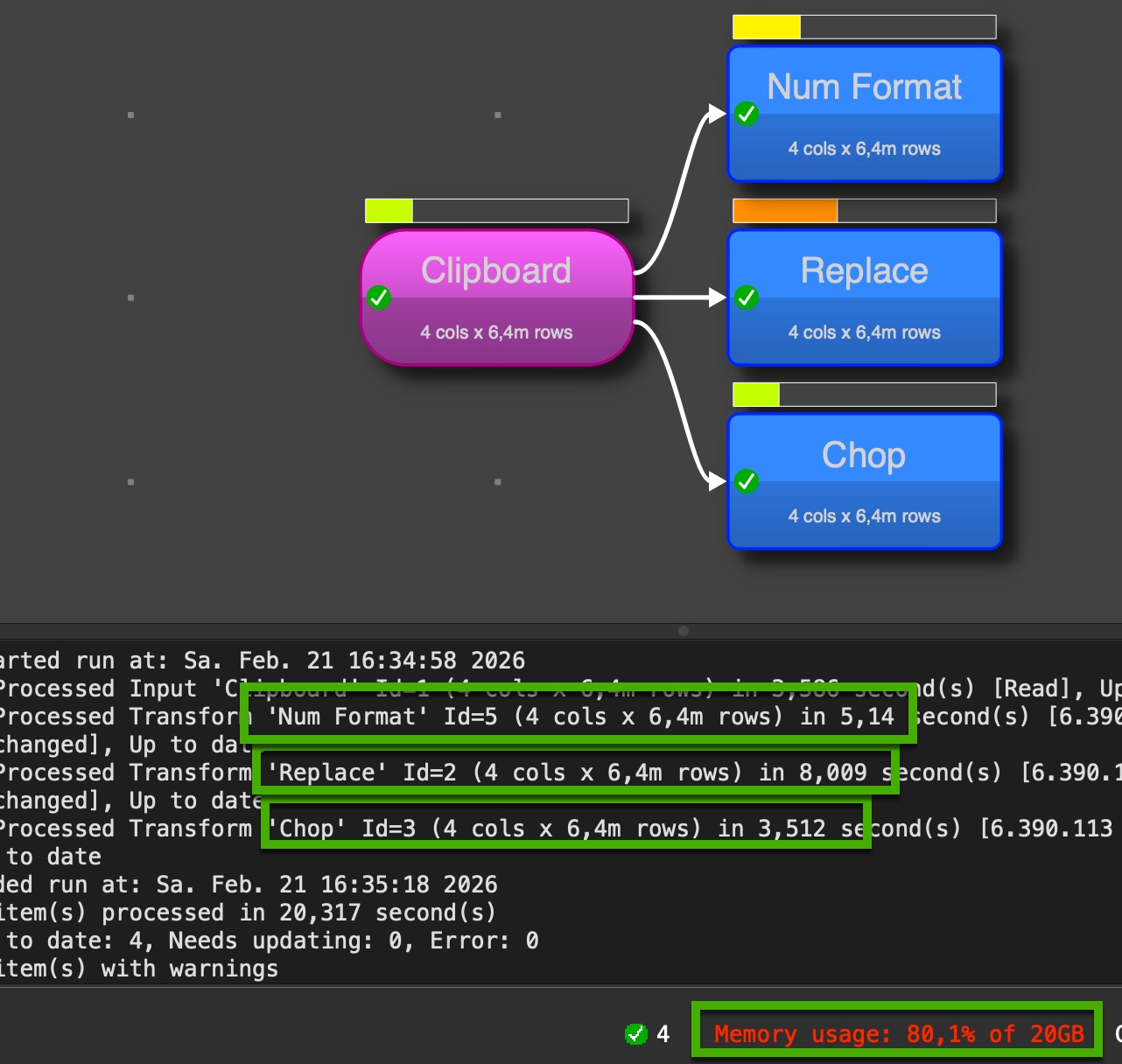
@Admin I tried this with version 2.10 (above screenshots) and the last one in the 2.11 beta 4, behavior is the same
We use some memory compression techniques to try to keep the amount of memory used under control. You can set Optimize processing for to Maximum speed in Preferences to turn off the memory compression. But it will often make things slower, due to the additional memory required. So I wouldn’t recommend it. We should perhaps rename or remove that option.
You would have to be sure about the form of the input data. Extract is probably a safer choice and nearly as fast.
Notebook is off currently, I think I have Maximum speed set as I don‘t have any memory issues. WiIl check and compare when I‘m on notebook next time.
Fun with computers.
I went with @Olaf’s option, 6.4 million rows, comparing speed vs memory optimisations and an M2 Air with 16 GB with an M2 Studio Max with 32 GB. Final tests were on the latter, the speed differences being pretty negligible between them as expected. Both Replace and Num Format were run with software restarts after changing optimisations.
Summary: it is all pretty inconsequential.
- Optimising for memory used half as much of the allocated 10GB, 12.2% rather than 23%
- In either optimisation, timing ratio between Replace (regex) and Num Format was about 2.2x rather than near 19:1.
- Actual processing time for Replace was around 5.5s, with about 2.5s for Num Format.
- Optimising for speed was faster by about 1% for Regex and 4% for Num Format
Despite the fact that optimising for memory used half as much memory with a practically negligible loss of speed (good work Andy), I am sticking with speed optimisation, because I have more memory to throw at it should it ever be needed, and one can always switch.
If @Phil’s process is slow (how large is your data set?) then apart from switching to Num Format I can only suggest a newer processor. For 6.4M rows with Regex then less than a second per million seems pretty good
Footnote: Very speculatively, I wonder whether the repetition in our test data enabled the system to repeat tasks from cache?
1 Like
appreciate all the responses - i have 30 million data set - my experience the larger the dataset it needs a lot of RAM and the Regex transformation was taking quite some time.
I wonder, too, the memory use is down to about 13% and even the processing time is faster with the “minimum memory use” option selected. But indeed there are just 20 unique records in the test data.
Yes, it is probably doing significant caching with only 20 different values. You can use Sequence and Random to generate a large data set with less repetition.
With a Mac M1 chip there is less difference between Replace (with regexp) and Chop (1.85s vs 0.36s or ~5:1).
interesting as well is the fact that are lookups need way less RAM than a join- so for RAM saving i do for example rather 10 lookup in a row then one join.
A Lookup only adds 1 column. A Join adds all column, minus the key column.
Buying more RAM might be a good investment, if that is an option.
1 Like