Hi
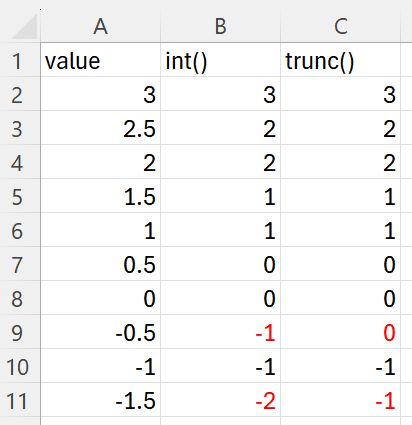
I have been using a function in Excel called “Trunc”, it simply extracts the integer from a number. How can I replicate that functionality in EDT
Thanks Bob
Hi
I have been using a function in Excel called “Trunc”, it simply extracts the integer from a number. How can I replicate that functionality in EDT
Thanks Bob
I don’t know a direct transformation for it, but you can use split column and split by the delimiter , or . (depending on what is you decimal separator). Afterwards you remove the second created column. The first generated column has the integer.
Hi
I need to use both new columns in calculations. How do I preserve the numerical format in both new columns? In the decimal, I lose the preceding 0. when the integer is removed
Thanks
I think if the loaded data the 0,22 is set you have the 0. If it is ,22 you are right the first value is empty.
Replace transformation with replace “empty” with 0 is your friend. See example transform file, too.

bobhabbijam example.transform (2.5 KB)
But column 3 is still not numerical.
Sorry it is numerical but does not have the right decimal in the calc
Can you show an example of what you are doining and what is the intended result?
| 1 | 2 | 3 | Calculate |
|---|---|---|---|
| 5,22 | 5 | 22 | 220 |
| -7,33 | -7 | 33 | 330 |
| 0,55 | 0 | 55 | 550 |
| -0,77 | -0 | 77 | 770 |
| 20,66 | 20 | 66 | 660 |
| ,66 | 0 | 66 | 660 |
I need column 3 to be 0.22 - 0.33 etc so I can perform calculations
Thanks
Ok looks good, thank you Regards
Here is another approach using sign(), abs(), floor() and multiply to get the integer part:
trunc.transform (4.3 KB)
I will make a note to add it as a possible option for Calculate. I’m not convinced about the name Trunc though. Any suggestions for a better name?
Int or less often Integer are common alternatives.
True, Trunc is effectively a string operation. Perhaps it should be in that set rather than Calculate
honestly, I don’t think it is worse implement or extend a function which can be implemented with 2 steps in EDT as a new transformation.
I think the challenge was that @bobhabbijam needed to use the decimal numbers for further calculations, too.
We have in my current project project the need to calculate the net working days “networkingdays()” in Excel, we do this in Excel which is much more efficient. I implemented this a finger exercise in EDT which required about 25 transformations. So we will stick to copy the required data set into Excel and calculate there. I just want to state that there might be more complex functions which are more valuable …. (and I don’t request to get my exercise as a new transformation in EDT)
There is a danger that, if we add too many transforms (or options for each transform), it will become too hard to find the one you need.
Given, as I said, trunc is a string function, I did the task with regex in Replace.
bobhabbijam regex.transform (3.0 KB)
Take a copy of the columns, then using exactly the same regex in the next two transforms, pick off the first part in column 1 and second part in column 2. Convert empty to zero.
Given the ease of this task, and that it fits properly in Replace, I am not voting for a new function or functional component.
The initial solution offered worked, so I’m Ok if there is no new function.