Csv file with limiter and delimiter

Ive got a CSV File with the delimiter for fields of ¶ and a valuelimiter of ¦

Currently i change the delimiter to ¶ and use a replace to remove the ¦, which is pita, if you have a lot of files to tackle. Since the fields might contain almost every character within text flow, there is no use for “ or ; or : .

So, how can i make life easier for me? I cannot change the value limiter, or am i mistaken? it only says quoted or unquoted or am i barking up the wrong tree?

Best

By ¶, do you mean new line (LF or CRLF)?

If the input looks like this:

A¦B¦C
a¦b¦c

Then you should be able to parse it like this:

That should work, unless your data can contain ¦ characters or carriage returns, in which case you need quoting.

No. That one ¶ is the limiter for fields.

My data looks like this:

¦ABC ¶¦DEF¦GHI¦¶¦JKL¦

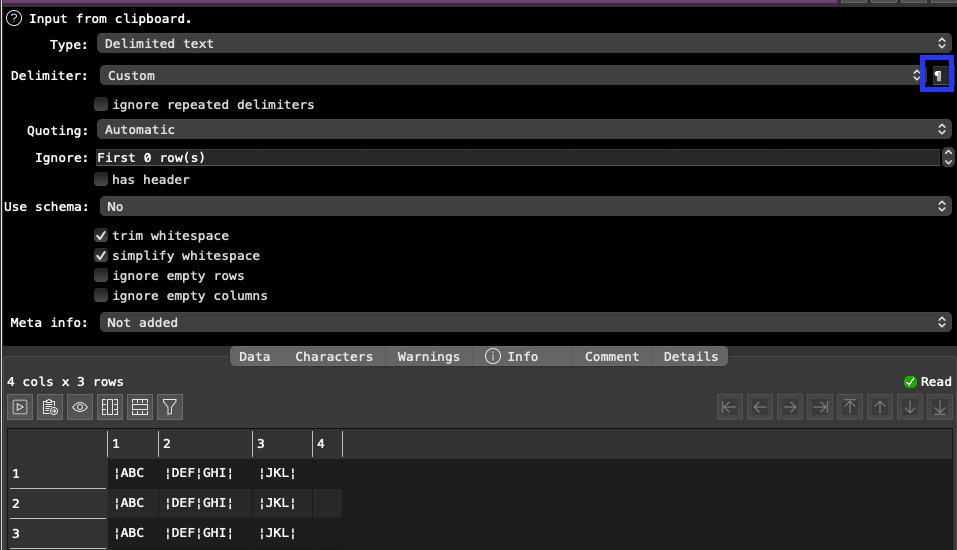
When I use the ¶ as delimiter, my data looks like this:

¦ABC¦

¦DEF¦GHI¦

¦JKL¦

So for each file I have to use a replace to get rid of them

Or I first import it in Open Office, where you can use field and value delimiter and the export it as xls to import, which makes it impossible to batch process…

.

I am a bit confused about what you are trying to do.

In a standard CSV file commas in the field (value) delimiter and LR or CRLF is the record (row) delimiter.

If you input:

¦ABC ¶¦DEF¦GHI¦¶¦JKL¦

Is ¦ the field delimiter and ¶ the record delimiter?

How do you want it to appear in the data table. Perhaps screenshot the data table?

What do you mean by ‘¶’?

  • The pilcrow character (Unicode U+00B6)
  • Line Feed, LF (ASCII 0A)
  • Carriage Return + Linefeed, CR+LF (ASCII 0D + ASCII 0A)
  • something else?

where is the issue? It copied pot row in a text editor in some rows. when I read it in and follow @Admin recommendation with the cisom delimiter and copy your ¶ sign in, I get a split in columns

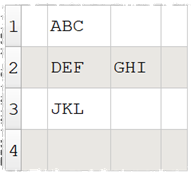
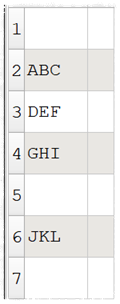
the value should read ABC DEF GHI JKL not

¦ABC

¦DEF¦GHI¦

¦JKL¦

See above in Open Office Calc. I can select “Seperated by” other and enter ¶ and enter ¦ as text delimiter. In EDT i can only enter the field delimiter, which is ¶. To get rid of the text delimiter (¦) I’d need a replace function, which i wanted to avoid. Since i can get full blown text with almost any character, those two are the only ones, which won’t be used in text fields, so i ended up with them as delimiters.

Forgot: there is the option of quoted values, but since my values aren’t put in “, but in ¦, this won’t work out.

so your delimiter are “¶”, “¦“ or a combination of both?

try this one, should do same what you do in Calc and can be extended for “ in the replace, too or in a separate replace

xeokydo input process.transform (3.6 KB)

You may beed to consider the sequence in the replace. Replace works top down.

I am also confused about that.

Which is the record delimiter?

I’m struggling here. I think we are using different terminology. Is:

¦ABC ¶¦DEF¦GHI¦¶¦JKL¦

Supposed to parse as:

Or:

?

This example covers both cases:

parse-custom-delim.transform (5.0 KB)

it assumes you don’t have linefeeds, carriage returns or delimiter characters in your data.

Note that currently Easy Data Transform supports custom field delimiters on input. But it doesn’t support custom record (row) delimiters on input. That is on the wishlist. So you have to use Split Col with Into = Rows instead.
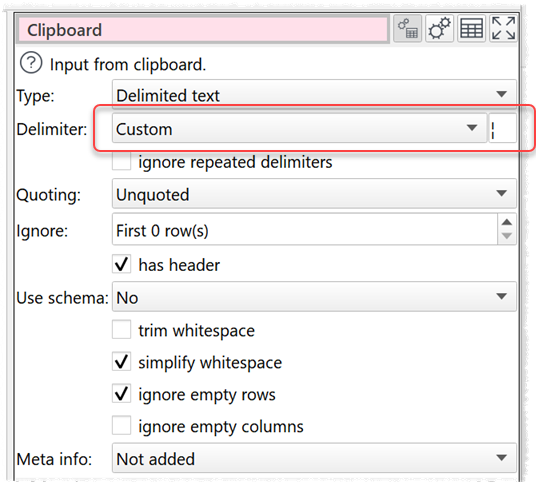
1 Like

I understood it should be in one row … I think we showed the different alternatives.

But I would like to get a clear understanding what is understood under a field versus a valuelimiter?