I’m currently trying out EDT. And while I find many of the possibilities quite useful (compared to my usual text editor regex shenanigans), I feel that some IMHO simple things are much more cumbersome than they should be. Or I fail to achieve them completely.
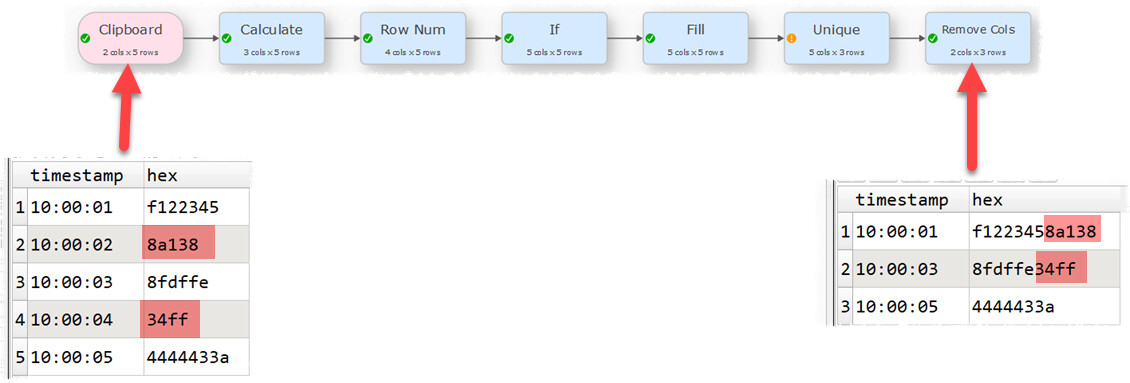
For example I have 2 columns, one containing a timestamp, the second containing a string of hexadecimal values. If the string in the second column is shorter than a certain length, it should be appended to the previous row.
I added a “Calculate” to get a new column with the length of the string and then though I could “Concat Rows”. But it works quite differently than I expected. “Fixed” and “By key” aren’t the right options here obviously. “Variable“ doesn’t let me choose the column to check though. It seem to check every cell, no matter the column. While trying things out I sometimes even ended up with more rows than I started with by splitting rows into multiple rows, which is weird for a function called “Concat rows“.
I’m essentially searching for a mode “If”, which allows me to specify conditions for one (or even multiple) columns that, if met, append the current row to the previous one (or appends the following one to this one; the behavior should be selectable). I wouldn’t mind doing all this in Javascript. But unfortunately a “Javascript” node can’t do any transforms like adding or concatenating rows (it’s more like a calculate) and I didn’t find a way to even get values from a cell in a different row (which would have been a solution here, with a subsequent filter).
It would also be nice, if such simple functions like length could be used directly in a condition and wouldn’t need a previous Calculate step and helper column. Because these columns are a PITA to remove as there is no dynamic way of doing that as far as I can tell, which is actually quite problematic, if you don’t know how many rows will be concatenated.
Note that you can use Unique to aggregate rows based on a key. You can create a key according to the length of the value in a column. For example concatenating rows where hex is <= 4 characters:
@Lupin, I understood you intend to concat the rows and not the columns. You can do this based on the approach from @Admin, too, using Concat Rows after the Fill transformation.
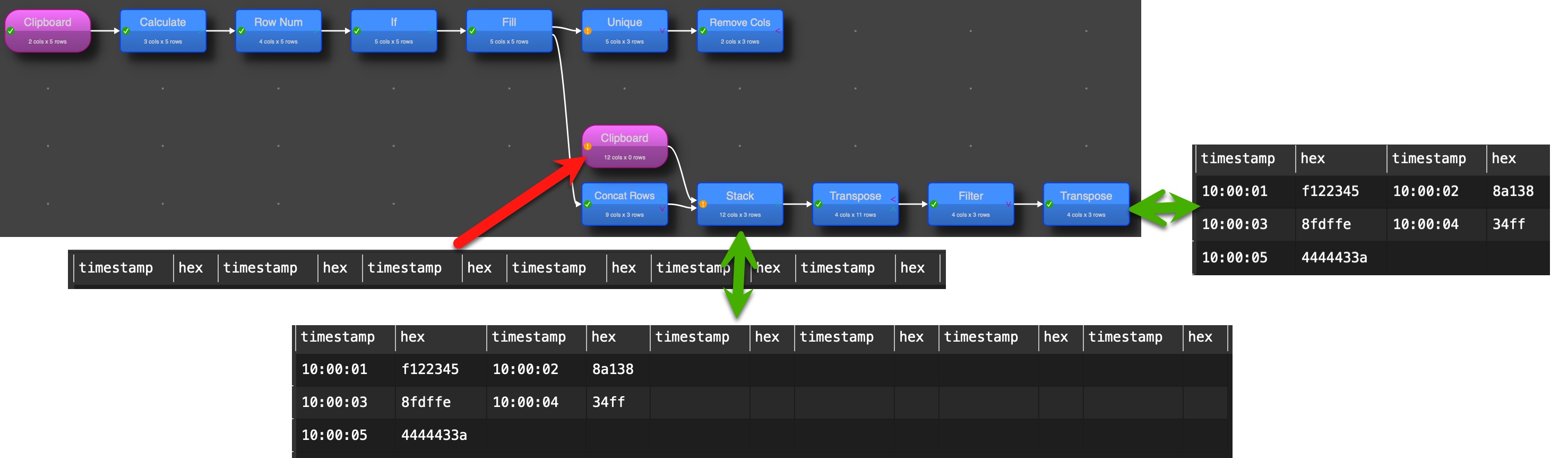
Now you have the challenge to get rid of the “helper” field. You can get. just the fields you need (in an oder you define) with Stack transformation. Here I copied the columns names multiple times together (in the example four times assuming not more than 4 rows will be concatenated), only the intended columns without “helpers” stay, when you tick the option “use only top dataset columns”
As there is no possibility to remove empty columns a small trick can be used. Transpose the table and filter to keep only “not empty” rows and transpose again and you get the table with the number of columns with values.
EDT gives a lot possibilities and power, but sometimes it is required to consider for some creative solutions. As I have said in another conversation in forum some days ago, specially in large complex datasets I appreciate the “helper” columns as they make checks and analysis much easier instead of changing existing columns. Your concat rows scenario is special, but I have for instance a lot of transformation files with Split Column where I don’t know the number of resulting columns (mostly I need the first or second part) and with the stack I can get rid of the flexible number of interim columns created.